
Zipline - Drone Delivery
ZiplineFood & Drink
4.9372.00 Reviews
- Version
- 4.28.0
- Installs
- 50.00K
- Age Rating
- Everyone
Screenshots
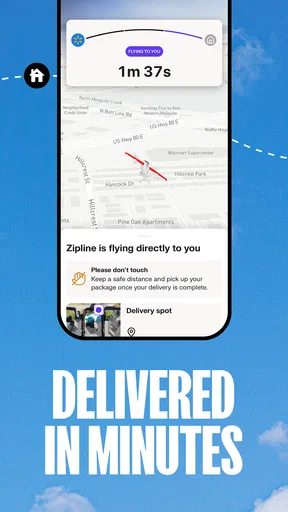
Our Review of Zipline - Drone Delivery
 Analysis by Appyee
Getting food or groceries delivered sounds simple until the usual process becomes tiring, confusing, or physically difficult. Zipline takes a different approach: it is a free Food & Drink app from Zipline built around drone delivery. I found the idea most interesting not as a novelty, but as a possible alternative for people who want to avoid a long trip to a shop, carrying bags, or waiting for a conventional courier at the door.
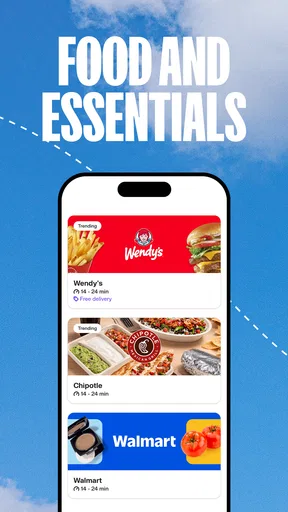
The experience is aimed at everyday ordering rather than aviation enthusiasts. Its store summary presents it as a place for food, groceries, and more, while the short description is simply “Zipline.” That leaves the app’s real value in the practical details of using it: whether browsing feels manageable, whether the delivery model suits your location and routine, and whether receiving an order is easier than relying on a supermarket visit or a standard delivery service.
How Zipline feels to use when clarity matters
My first impression is that an app like this needs to make the ordering journey understandable before it tries to feel impressive. Drone delivery naturally creates extra questions: what can be ordered, where does it arrive, how will I know the order is ready, and what happens if I cannot quickly reach the drop-off point? A clear path through those decisions matters more than flashy presentation.
For readers who depend on larger text, strong contrast, or predictable screen layouts, the practical test is whether the important information remains easy to locate while browsing. Product names, quantities, prices, delivery details, and order status all compete for attention in a food-ordering app. I would advise taking a few minutes on the first order to identify where the basket, address, and tracking information live. That small familiarization step can reduce stress later, especially if you are ordering while hungry, tired, or in a hurry.
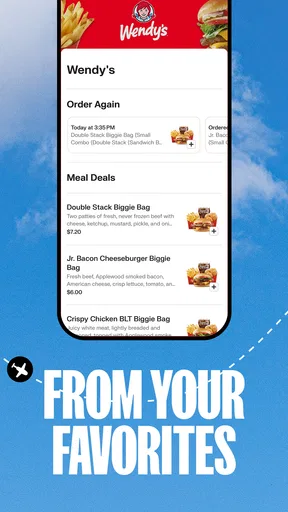
The app has a useful advantage over a broad marketplace: the delivery concept gives the experience a more focused purpose. You are not necessarily comparing an endless list of restaurants and couriers. Instead, the central question is whether the available food or grocery selection fits your immediate need and whether drone delivery works for your address. That narrower decision can feel less overwhelming than scrolling through a large conventional delivery platform.
At the same time, a focused service can feel restrictive if you expect the variety of a major supermarket app. People with dietary requirements, familiar brand preferences, or a very specific shopping list should check the available selection before building their routine around it. The right way to judge Zipline is not by asking whether it replaces every grocery option, but whether it handles the smaller, time-sensitive orders you actually make.
One helpful habit is to prepare a short repeat-order routine. If you regularly need breakfast items, snacks, basic ingredients, or a forgotten household item, keep those needs in mind when browsing. The benefit is not only speed; it is reducing the number of choices you must process. For someone with attention difficulties or decision fatigue, a service becomes more useful when it supports a familiar pattern rather than forcing a fresh search every time.
Zipline has a strong public reception, with a 4.9 average from around 1.8 thousand ratings. That suggests many users find the overall experience satisfying, although a rating cannot tell me whether the app suits every access need or every delivery area. I treat it as encouragement to try the service, not as a substitute for checking how the ordering flow works on my own device.
Readable ordering is more than large words
Accessibility is not only about whether text can be read. It also includes whether instructions appear at the moment they are needed and whether the app avoids making users remember too many steps. Drone delivery can introduce unfamiliar instructions, so concise explanations are especially valuable. If a user has to interpret a complicated series of arrival directions while managing a mobility aid, caring for a child, or dealing with poor lighting, the experience becomes less inclusive even if the text itself is technically legible.
I would use the app when I have enough time to review the delivery instructions calmly, particularly on a first order. A familiar order is likely to be easier than an urgent first attempt. This is one of the main trade-offs: Zipline may reduce the physical work of shopping, but it does not remove the need to understand the process.
Motor, sensory, and communication considerations
The clearest potential benefit is physical. Ordering remotely can help someone who finds walking to a shop, navigating aisles, lifting packages, or carrying bags difficult. It can also help after an injury, during illness, or on days when energy is limited. In my view, this is where the app has a more meaningful use case than its futuristic image suggests.
A realistic example would be a person who realizes in the evening that they are missing ingredients for breakfast. A conventional trip may involve dressing appropriately, travelling, finding the items, standing in a checkout queue, and carrying everything home. A drone order could reduce that chain of effort. The user still needs to place the order and receive it, but the physically demanding middle section may be shorter.
That benefit has limits. A delivery to a point that is technically nearby may still be inaccessible if the person cannot safely reach it. Uneven ground, stairs, snow, heavy rain, poor lighting, or a need to keep one hand on a walking aid can turn a convenient handoff into a difficult one. Before relying on the app for essential items, I would test a small order and observe the complete journey from notification to collection.
For users with hearing loss, audio-only alerts would be a concern in any delivery workflow. For users with low vision, sudden arrival information or instructions that depend heavily on visual confirmation could create friction. I cannot treat a drone service as automatically accessible simply because it avoids a shop visit. The app may reduce one barrier while leaving another untouched at the final stage.
People with sensory sensitivities may also want to think about the delivery environment. A drone arriving overhead, the sound of its operation, or the need to move quickly outside could be uncomfortable for some users. Others may appreciate avoiding the noise, crowds, smells, and unpredictable interactions of a busy store. The better choice depends on which part of the shopping experience is most difficult for you.
Motor accessibility also includes the phone interaction itself. Small controls, repeated scrolling, or a checkout that requires precise taps can be tiring for people with tremors or limited dexterity. I recommend using the app when seated and not while carrying anything. If you use system-level touch accommodations, screen magnification, voice control, or an external keyboard, the most useful test is whether you can complete a modest order without needing delicate, rapid gestures.
There is another less obvious consideration: substitutions and mistakes. A person who cannot easily travel to a shop may have fewer options if an item is unavailable or the delivered product is not suitable. Before depending on Zipline for a medically important ingredient, allergy-sensitive food, or a precise household item, I would keep a backup plan. Convenience is valuable, but it should not become dependence on a single delivery method for something urgent.
Who benefits most from the delivery model?
I see the strongest fit for people who need a quick top-up rather than a full weekly shop. That includes someone working from home, a caregiver who cannot leave easily, a person recovering from illness, or anyone who has forgotten one or two essentials. It may also suit households that want to avoid a short but inconvenient car trip for a small purchase.
It is less compelling for shoppers who enjoy visiting stores, need to inspect fresh produce personally, buy large quantities, or want the broadest possible choice. A conventional supermarket trip can be better when you need to compare sizes, check labels closely, or combine many errands in one outing. A standard courier app may also be preferable when you need a restaurant that is outside Zipline’s available selection or when a door-to-door handoff is essential.
Situational access: when the app fits real routines
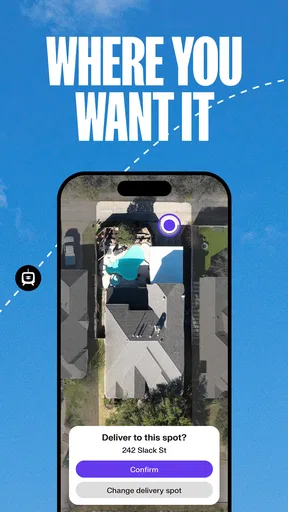
Location is central to the experience. Drone delivery is not simply a feature that works identically everywhere; it depends on whether the service can reach the user’s area and whether the delivery point is practical. I would not assume that being able to install the app means every address can use every part of the service. The sensible approach is to enter your location early and confirm the available options before planning a meal or grocery run around it.
This matters particularly for people living in apartments, shared housing, gated communities, dense urban areas, or places with limited outdoor access. A user may be able to order from home but still face a difficult final walk. If you live with another person, you might arrange for them to collect the delivery, but that changes the independence benefit. For some households, the app will be a genuinely useful backup; for others, a regular courier who comes directly to the door will remain more practical.
Weather and daylight can influence how comfortable the final step feels. Even without treating these as app-specific failures, they are part of responsible planning. I would avoid making a first attempt during a storm, late at night, or when I am already struggling with mobility. A calm daytime test gives a clearer picture of whether the service supports my routine.
There is also a social dimension. Some users may prefer drone delivery because it reduces face-to-face interaction, which can help people with social anxiety, speech difficulties, or communication fatigue. Others may need a courier to explain a problem, carry an item, or confirm that the order has arrived. A low-contact experience can be liberating, but it can also remove the human assistance that some people rely on.
For caregivers, the app could be useful when a dependent person needs a small item and leaving the home is not realistic. However, I would still make sure the recipient understands where to go and what to expect. If the user has memory difficulties, a delivery notification alone may not be enough. A shared household routine, written reminder, or support person can make the process safer and less stressful.
Families should also consider whether the delivered items are manageable once collected. Avoid ordering a quantity that is difficult to lift or carry from the landing area. The best accessibility gain comes from matching the order size to the person’s strength and the distance from the delivery point to the kitchen, not simply from avoiding the store.
Remaining barriers I would consider before depending on it
The biggest limitation is that the app’s promise is more specific than the broad phrase “food, groceries, and more” might suggest. It is not automatically a replacement for a supermarket, restaurant marketplace, or personal shopping service. The selection, delivery area, and handoff experience determine whether it is useful in a particular household. I would treat it as an additional option, especially at first, rather than uninstalling every alternative.
Another barrier is the learning curve created by an unfamiliar delivery format. A standard courier arrives at the address and usually interacts with the customer directly. With a drone service, the user may need to understand a designated collection point and be ready at the appropriate moment. That can be manageable for many people, but it asks more of users who have limited mobility, reduced vision, hearing difficulties, or anxiety about unexpected events.
Notifications deserve practical attention. If you regularly keep your phone on silent, use focus modes, or have difficulty noticing visual alerts, you may need a personal routine for checking order progress. Missing an ordinary delivery is inconvenient; missing a delivery that requires reaching a particular point can be more frustrating. I would place the order when I can monitor it rather than while travelling, sleeping, or handling another demanding task.
There is also the question of support when something goes wrong. Any delivery can involve a missing item, an incorrect product, or a handoff that does not happen as expected. For a user who cannot easily return to a shop, resolving that problem may be harder. I would keep receipts and order details accessible and avoid using the service as the only source for essentials until I know how smoothly problems are handled in my own situation.
The app is free to install and is rated for Everyone, which makes trying it straightforward for a broad audience. Its current version is 4.28.0, and it runs on Android 7.0 or later. Those details make it approachable for people using older Android phones, although the age of a device can still affect performance, screen readability, battery life, and compatibility with system accessibility tools.
Zipline has passed the early adoption stage, with over 50 thousand installs and hundreds of written reviews. That is enough to suggest an active user base without making the service feel universal. I would still make the decision based on local usefulness: can I reach the drop-off point, can I follow the alerts, and does the available food match what I need?
My inclusive verdict after weighing convenience against control
I like Zipline most when I view it as a targeted accessibility aid rather than a magical solution. It can reduce travel, carrying, queues, and unnecessary social contact. For someone whose main barrier is getting to a shop, that reduction may be substantial. The service is also appealing for small, urgent orders where a full shopping trip feels disproportionate.
My recommendation comes with a clear test: start with a low-stakes order during daylight, when you have time to watch the process and reach the collection point safely. Notice how much effort the app saves and where it adds effort. That experiment answers more than a high rating can, because accessibility depends on the person, the home, the route, and the delivery context.
I would choose a conventional grocery app when I need a large shop, detailed product comparison, or door-to-door assistance. I would choose a regular restaurant delivery service when selection and direct handoff matter more than the drone model. I would choose Zipline when avoiding the trip itself is the priority and the local delivery setup works comfortably.
Overall, Zipline is a thoughtful option for people who want food and grocery delivery with less dependence on a physical store visit. Its strongest contribution is practical: it may turn a tiring errand into a manageable order. Its weakest point is the final handoff, where mobility, sensory needs, weather, notifications, and location can still create barriers. Try it as a carefully tested convenience, not as a guaranteed substitute for every other way of shopping.
Verdict
Strengths of Zipline - Drone Delivery
- Fast delivery for eligible medical supplies and essential goods.
- Uses autonomous drones to reduce road traffic and delivery emissions.
- Real-time order tracking helps users follow the delivery process.
- Designed to reach remote areas with limited road access.
- Contactless delivery improves convenience and reduces physical interaction.
Limitations of Zipline - Drone Delivery
- Service availability is limited to selected regions and partner locations.
- Not every product or order qualifies for drone delivery.
- Weather conditions may delay or cancel scheduled deliveries.
- Delivery fees and minimum order requirements can vary by location.
- Requires a compatible smartphone and reliable internet connection.
Similar Picks in This Category
View All
Rappi: Food Delivery, Grocery
Rappi, Inc - Delivery3.5

McDonald’s: Cupons e Delivery
Arcos Dorados4.3

Swiggy: Food Instamart Dineout
Swiggy4.7

Blinkit: Groceries & more
Blinkit4.8

foodpanda: food & groceries
Foodpanda GmbH a subsidiary of Delivery Hero SE4.0

Zomato: Food Delivery & Dining
Zomato4.7
Frequently Asked Questions
What is Zipline – Drone Delivery and how does it work?
Zipline – Drone Delivery is a service that uses autonomous aircraft to transport selected products, such as medical supplies, prescriptions, groceries, and other everyday essentials. Through the app, you can check whether delivery is available in your area, browse eligible items, place an order, and follow its progress. Availability, delivery times, and product categories depend on the local Zipline network and participating partners.
Where is Zipline – Drone Delivery available?
Zipline is not available in every city or country, so the first step is entering your delivery address or checking the service map in the app. Coverage depends on local regulations, operating bases, partner stores, and weather conditions. Even in a supported region, some neighborhoods may be outside the current flight range. The app should show whether your address is eligible before you complete an order.
What products can I order through Zipline?
The available catalog varies by location and by Zipline’s local retail, healthcare, or government partners. Depending on your area, you may find pharmacy items, medical products, groceries, convenience goods, or other approved essentials. Some products can have purchase limits or age and prescription requirements. The app displays the items currently eligible for drone delivery, along with any relevant ordering restrictions.
How fast is Zipline drone delivery, and can I track my order?
Zipline is designed to provide rapid delivery, but the exact time depends on the distance, order preparation, airspace rules, weather, and demand. After placing an order, the app generally provides status updates as the partner prepares it and the drone begins its journey. Tracking information may become more detailed near dispatch and arrival, although estimated times can change when operating conditions are unfavorable.
Is Zipline drone delivery safe, and what happens when the drone arrives?
Zipline’s delivery system is built around autonomous aircraft, monitored operations, and designated delivery procedures rather than ordinary doorstep driving. When the drone reaches the approved location, it may lower or release the package using the service’s delivery equipment, depending on the local setup. You should follow the app’s instructions, keep the delivery area clear, and contact support if an order is delayed, damaged, missing, or delivered incorrectly.
